> ## Documentation Index
> Fetch the complete documentation index at: https://cometchat-22654f5b-docs-ios-ui-kit-sdk-fixes.mintlify.site/llms.txt
> Use this file to discover all available pages before exploring further.
# Launch Call Screen On Tap Of Push Notification
> Guide to launching the incoming call screen from UI Kit when user taps a call push notification.
**Quick Reference for AI Agents & Developers**
* **Requires:** CometChat SDK and UI Kit both configured
* **Implementation:** Handle notification tap in `AppDelegate` or `SceneDelegate`
* **Parse payload:** Extract call session ID from notification payload
* **Launch:** Present `CometChatIncomingCall` view controller
* **Related:** [Ringing](/sdk/ios/default-calling) · [Push Notifications](/sdk/ios/push-notification-overview) · [UI Kit](/ui-kit/ios/overview)
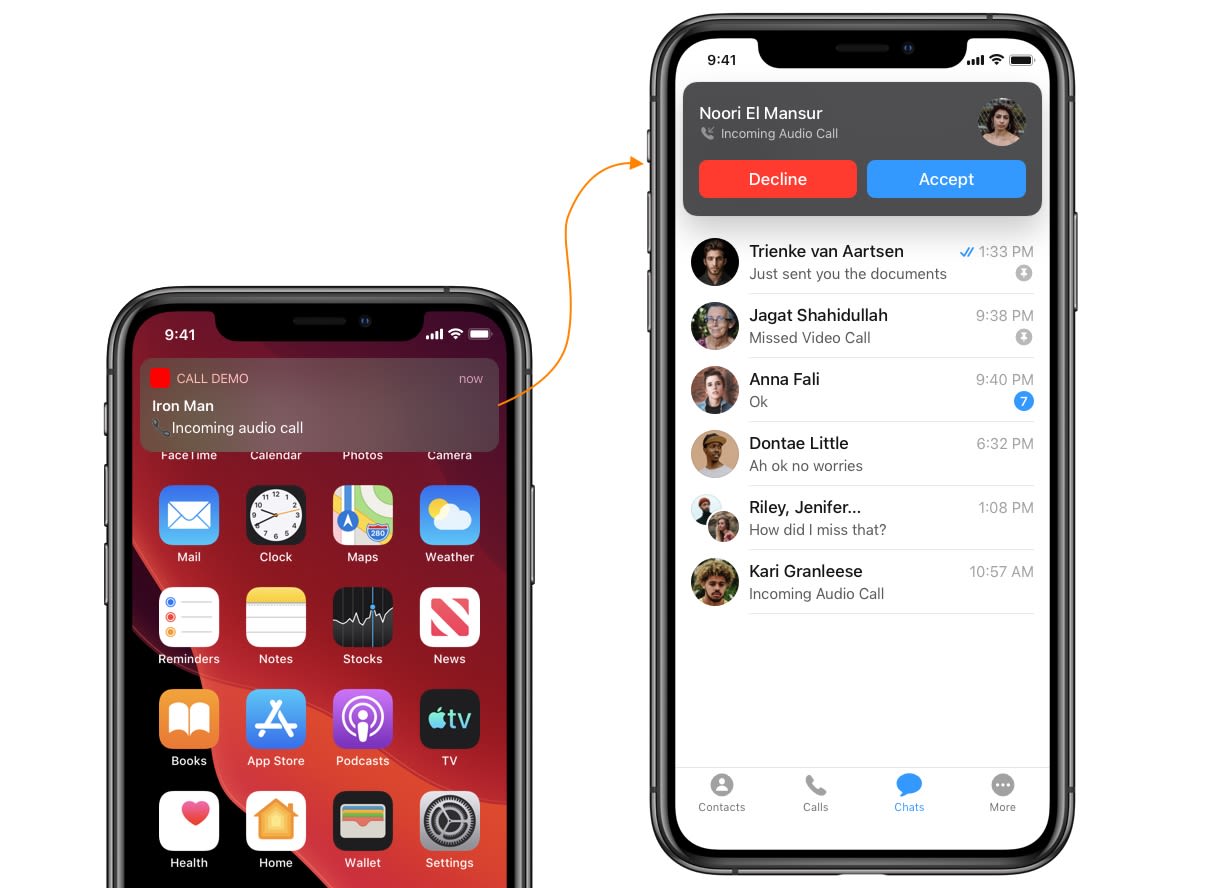 This guide helps you to launch an incoming call screen from the UI Kit library on receiving an incoming call notification.
CometChat SDK & UI Kit both need to be configured before launching the call screen.
***
## Step 1. Process push notification payload and grab `Call` object
To present an incoming call screen, firstly you will need a `Call` object. You can grab this from the push notification payload itself of incoming call notification. You need to call `CometChat.processMessage()` method to process push notification payload.
```swift theme={null}
func userNotificationCenter(_ center: UNUserNotificationCenter,
didReceive response: UNNotificationResponse,
withCompletionHandler completionHandler: @escaping () -> Void) {
if let userInfo = response.notification.request.content.userInfo as? [String : Any], let messageObject = userInfo["message"] as? [String:Any] {
print("didReceive: \(userInfo)")
if let baseMessage = CometChat.processMessage(messageObject).0 {
switch baseMessage.messageCategory {
case .message:
print("Message Object Received: \(String(describing: (baseMessage as? TextMessage)?.stringValue()))")
case .action: break
case .call: break
case .custom: break
@unknown default: break
}
}
}
completionHandler()
}
```
**userInfo Dictionary Structure:**
| Parameter | Type | Description |
| --------- | -------------- | ---------------------------------------------------------------------------------------------------------------------- |
| message | \[String: Any] | Message dictionary containing call details. See [message Dictionary](#push-notification-message-dictionary-call) below |
| aps | \[String: Any] | Apple Push Notification Service payload. See [aps Dictionary](#push-notification-aps-dictionary) below |
**message Dictionary:**
| Parameter | Type | Description |
| ------------ | -------------- | --------------------------------------------------------------------------------------------- |
| id | Int | Unique message identifier. Example: `98765` |
| category | String | Message category. Example: `"call"` |
| type | String | Call type. Example: `"audio"` or `"video"` |
| sessionId | String | Unique call session ID. Example: `"v1.us.call_session_xyz789"` |
| sender | \[String: Any] | Sender user details. See [sender Dictionary](#push-notification-sender-dictionary-call) below |
| receiver | String | Receiver UID. Example: `"cometchat-uid-2"` |
| receiverType | String | Receiver type. Example: `"user"` |
| status | String | Call status. Example: `"initiated"` |
| sentAt | Int | Unix timestamp when call was initiated. Example: `1699800000` |
**sender Dictionary:**
| Parameter | Type | Description |
| ------------ | ------ | ---------------------------------------------------------------- |
| uid | String | Sender's unique ID. Example: `"cometchat-uid-1"` |
| name | String | Sender's display name. Example: `"Andrew Joseph"` |
| avatar | String | Sender's avatar URL. Example: `"https://example.com/avatar.png"` |
| status | String | User online status. Example: `"online"` |
| role | String | User role. Example: `"default"` |
| lastActiveAt | Int | Last active timestamp. Example: `1699799000` |
**aps Dictionary:**
| Parameter | Type | Description |
| --------------- | -------------- | -------------------------------------------------------------------------------- |
| alert | \[String: Any] | Alert content. See [alert Dictionary](#push-notification-alert-dictionary) below |
| badge | Int | Badge count. Example: `1` |
| sound | String | Notification sound. Example: `"default"` |
| mutable-content | Int | Enables notification modification. Example: `1` |
**alert Dictionary:**
| Parameter | Type | Description |
| --------- | ------ | ----------------------------------------------------------- |
| title | String | Notification title. Example: `"Incoming Call"` |
| body | String | Notification body. Example: `"Andrew Joseph is calling..."` |
**Method Signature:**
| Parameter | Type | Description |
| --------- | ----------------------------------- | ---------------------------------------- |
| Input | \[String: Any] | Push notification message dictionary |
| Returns | (BaseMessage?, CometChatException?) | Tuple containing parsed message or error |
**Return Tuple Structure:**
| Index | Type | Description |
| ----- | ------------------- | ---------------------------------------------------------------------------------------------------------- |
| 0 | BaseMessage? | Parsed message object (Call when category is "call"). See [Call Object](#processmessage-call-object) below |
| 1 | CometChatException? | Error object if parsing fails. `nil` on success |
**[Call](/sdk/ios/default-calling#call-properties) Object Properties:**
| Parameter | Type | Description |
| --------------- | --------------------------------------------------------------- | ---------------------------------------------------------------------------- |
| id | Int | Message ID. Example: `98765` |
| muid | String | Message unique ID. Example: `"muid_abc123"` |
| messageCategory | [MessageCategory](/sdk/ios/messaging-overview#message-category) | Category enum. Example: `.call` |
| messageType | [MessageType](/sdk/ios/messaging-overview#message-type) | Type enum. Example: `.audio` or `.video` |
| sessionID | String? | Call session identifier. Example: `"v1.us.call_session_xyz789"` |
| callStatus | [CallStatus](/sdk/ios/default-calling#call-status) | Current call status. Example: `.initiated` |
| callType | [CallType](/sdk/ios/default-calling#call-type) | Type of call. Example: `.audio` or `.video` |
| sender | [User](/sdk/ios/users-overview#user-properties) | Sender user object. See [User Object](#processmessage-sender-user) below |
| receiver | [User](/sdk/ios/users-overview#user-properties) | Receiver user object. See [User Object](#processmessage-receiver-user) below |
| receiverType | [ReceiverType](/sdk/ios/messaging-overview#receiver-type) | Type of receiver. Example: `.user` |
| sentAt | Int | Unix timestamp. Example: `1699800000` |
| readAt | Int | Read timestamp. Example: `0` (unread) |
| deliveredAt | Int | Delivery timestamp. Example: `0` (not delivered) |
**sender [User](/sdk/ios/users-overview#user-properties) Object:**
| Parameter | Type | Description |
| ------------ | ------------------------------------------------- | -------------------------------------------------------------- |
| uid | String | User's unique ID. Example: `"cometchat-uid-1"` |
| name | String | User's display name. Example: `"Andrew Joseph"` |
| avatar | String? | User's avatar URL. Example: `"https://example.com/avatar.png"` |
| status | [UserStatus](/sdk/ios/users-overview#user-status) | Online status. Example: `.online` |
| role | String | User role. Example: `"default"` |
| lastActiveAt | Int | Last active timestamp. Example: `1699799000` |
**receiver [User](/sdk/ios/users-overview#user-properties) Object:**
| Parameter | Type | Description |
| --------- | ------------------------------------------------- | --------------------------------------------------------------- |
| uid | String | User's unique ID. Example: `"cometchat-uid-2"` |
| name | String | User's display name. Example: `"Jane Smith"` |
| avatar | String? | User's avatar URL. Example: `"https://example.com/avatar2.png"` |
| status | [UserStatus](/sdk/ios/users-overview#user-status) | Online status. Example: `.offline` |
| role | String | User role. Example: `"default"` |
**[CallStatus](/sdk/ios/default-calling#call-status) Enum Values:**
| Value | Description |
| ----------- | ----------------------- |
| .initiated | Call has been initiated |
| .ongoing | Call is in progress |
| .unanswered | Call was not answered |
| .rejected | Call was rejected |
| .busy | Receiver was busy |
| .cancelled | Call was cancelled |
| .ended | Call has ended |
**[CallType](/sdk/ios/default-calling#call-type) Enum Values:**
| Value | Description |
| ------ | --------------- |
| .audio | Audio-only call |
| .video | Video call |
## Step 2. Launch call screen (Method 1)
You can directly launch the view controller from the app delegate once you receive Call Object.
```swift theme={null}
if let call = baseMessage as? Call {
DispatchQueue.main.async {
let call = CometChatIncomingCall()
call.modalPresentationStyle = .custom
call.setCall(call: call)
if let window = self.window, let rootViewController = window.rootViewController {
var currentController = rootViewController
while let presentedController = currentController.presentedViewController {
currentController = presentedController
}
if (!call.isViewLoaded && (call.view.window != nil)) {
currentController.present(call, animated: true, completion: nil)
}
}
}
}
```
**CometChatIncomingCall View Controller Setup:**
| Parameter | Type | Description |
| ---------------------- | ------------------------------------------------ | --------------------------------------------------------------------------------- |
| modalPresentationStyle | UIModalPresentationStyle | Presentation style for the view controller. Example: `.custom` |
| setCall(call:) | [Call](/sdk/ios/default-calling#call-properties) | Method to set the Call object. See [Call Object](#incomingcall-call-object) below |
**UIModalPresentationStyle Values:**
| Value | Description |
| --------------- | --------------------------------------------------------- |
| .custom | Custom presentation style (recommended for incoming call) |
| .fullScreen | Full screen presentation |
| .overFullScreen | Overlay on full screen |
**[Call](/sdk/ios/default-calling#call-properties) Object Properties Used for Display:**
| Parameter | Type | Description |
| ---------- | -------------------------------------------------- | ---------------------------------------------------------------------------------------------- |
| sessionID | String | Session ID for the call. Example: `"v1.us.call_session_xyz789"` |
| callType | [CallType](/sdk/ios/default-calling#call-type) | Audio or video indicator. Example: `.audio` |
| callStatus | [CallStatus](/sdk/ios/default-calling#call-status) | Current status. Example: `.initiated` |
| sender | [User](/sdk/ios/users-overview#user-properties) | Caller information displayed on screen. See [sender Object](#incomingcall-sender-object) below |
**sender [User](/sdk/ios/users-overview#user-properties) Object (Displayed on Incoming Call Screen):**
| Parameter | Type | Description |
| --------- | ------------------------------------------------- | ---------------------------------------------------------------------------------- |
| uid | String | Caller's unique ID. Example: `"cometchat-uid-1"` |
| name | String | Caller name displayed on screen. Example: `"Andrew Joseph"` |
| avatar | String? | Caller avatar URL displayed on screen. Example: `"https://example.com/avatar.png"` |
| status | [UserStatus](/sdk/ios/users-overview#user-status) | Online status. Example: `.online` |
**View Controller Presentation Flow:**
| Step | Action | Description |
| ---- | ------------- | ------------------------------------------------- |
| 1 | Initialize | `let call = CometChatIncomingCall()` |
| 2 | Set style | `call.modalPresentationStyle = .custom` |
| 3 | Set call data | `call.setCall(call: callObject)` |
| 4 | Present | `currentController.present(call, animated: true)` |
If you are facing any difficulties while launching the Call Screen from App Delegate, then you can use another method.
## Step 2. Launch call screen (Method 2)
You can launch the call screen from your base view controller instead of launching it from the App Delegate. This method uses NotificationCenter to trigger and present Call Screen.
1. In this method you need to fire notification after you receive Call Object.
2. In Notification's user info you can pass Call Object to that desired notification.
### Trigger notification from App Delegate
```swift theme={null}
if let call = baseMessage as? Call {
DispatchQueue.main.asyncAfter(deadline: .now() + 0.5) {
NotificationCenter.default.post(name: NSNotification.Name(rawValue: "didReceivedIncomingCall"), object: nil, userInfo: ["call":call])
}
}
```
**NotificationCenter.default.post() Method Parameters:**
| Parameter | Type | Description |
| --------- | -------------------- | --------------------------------------------------------------------------------------------------- |
| name | NSNotification.Name | Notification identifier name. Example: `NSNotification.Name(rawValue: "didReceivedIncomingCall")` |
| object | Any? | Sender object (typically nil). Example: `nil` |
| userInfo | \[AnyHashable: Any]? | Dictionary containing call data. See [userInfo Dictionary](#notificationcenter-userinfo-call) below |
**userInfo Dictionary Structure:**
| Parameter | Type | Description |
| --------- | ------------------------------------------------ | ------------------------------------------------------------------------------------------------- |
| call | [Call](/sdk/ios/default-calling#call-properties) | The Call object to pass to the observer. See [Call Object](#notificationcenter-call-object) below |
**[Call](/sdk/ios/default-calling#call-properties) Object in userInfo:**
| Parameter | Type | Description |
| ------------ | --------------------------------------------------------- | -------------------------------------------------------------------------- |
| id | Int | Message ID. Example: `98765` |
| sessionID | String | Call session ID. Example: `"v1.us.call_session_xyz789"` |
| callType | [CallType](/sdk/ios/default-calling#call-type) | Type of call. Example: `.audio` |
| callStatus | [CallStatus](/sdk/ios/default-calling#call-status) | Current status. Example: `.initiated` |
| sender | [User](/sdk/ios/users-overview#user-properties) | Caller details. See [sender Object](#notificationcenter-sender-call) below |
| receiver | [User](/sdk/ios/users-overview#user-properties) | Receiver details |
| receiverType | [ReceiverType](/sdk/ios/messaging-overview#receiver-type) | Receiver type. Example: `.user` |
| sentAt | Int | Unix timestamp. Example: `1699800000` |
**sender [User](/sdk/ios/users-overview#user-properties) Object:**
| Parameter | Type | Description |
| --------- | ------------------------------------------------- | ---------------------------------------------------------------- |
| uid | String | Caller's unique ID. Example: `"cometchat-uid-1"` |
| name | String | Caller's display name. Example: `"Andrew Joseph"` |
| avatar | String? | Caller's avatar URL. Example: `"https://example.com/avatar.png"` |
| status | [UserStatus](/sdk/ios/users-overview#user-status) | Online status. Example: `.online` |
**Notification Dispatch Flow:**
| Step | Action | Description |
| ---- | ------- | ------------------------------------------------------- |
| 1 | Delay | `DispatchQueue.main.asyncAfter(deadline: .now() + 0.5)` |
| 2 | Post | `NotificationCenter.default.post(...)` |
| 3 | Observe | BaseViewController receives notification |
| 4 | Handle | Selector method extracts Call and presents UI |
3. On the other hand, you need to observe for the above notification in your base view controller
1) Base view controller is a controller that launches immediately after the app delegate.
2) Base view controller should be present to observe the notification when notification fires.
3) If the view controller is not present in the memory when a new notification receives, then it won't launch Call Screen.
### Observe notification in Base View Controller
```swift theme={null}
class BaseViewController : UIViewController {
override func viewDidLoad() {
NotificationCenter.default.addObserver(self, selector:#selector(self.didReceivedIncomingCall(_:)), name: NSNotification.Name(rawValue: "didReceivedIncomingCall"), object: nil)
}
}
```
### Add selector method & Launch call screen
```swift theme={null}
@objc func didReceivedIncomingCall(_ notification: NSNotification) {
if let currentCall = notification.userInfo?["call"] as? Call {
DispatchQueue.main.async {
let call = CometChatIncomingCall()
call.modalPresentationStyle = .custom
call.setCall(call: currentcall)
self.present(call, animated: true, completion: nil)
}
}
}
```
**NSNotification Object Structure:**
| Parameter | Type | Description |
| --------- | -------------------- | --------------------------------------------------------------------------------------------------- |
| name | NSNotification.Name | Notification identifier. Example: `"didReceivedIncomingCall"` |
| object | Any? | Sender object. Example: `nil` |
| userInfo | \[AnyHashable: Any]? | Dictionary containing call data. See [userInfo Dictionary](#didreceivedincomingcall-userinfo) below |
**userInfo Dictionary:**
| Parameter | Type | Description |
| --------- | ------------------------------------------------ | ----------------------------------------------------------------------------------------- |
| call | [Call](/sdk/ios/default-calling#call-properties) | The Call object from notification. See [Call Object](#didreceivedincomingcall-call) below |
**[Call](/sdk/ios/default-calling#call-properties) Object Properties:**
| Parameter | Type | Description |
| ------------ | --------------------------------------------------------- | ------------------------------------------------------------------------------ |
| id | Int | Message ID. Example: `98765` |
| sessionID | String | Call session ID. Example: `"v1.us.call_session_xyz789"` |
| callType | [CallType](/sdk/ios/default-calling#call-type) | Type of call. Example: `.audio` or `.video` |
| callStatus | [CallStatus](/sdk/ios/default-calling#call-status) | Current status. Example: `.initiated` |
| sender | [User](/sdk/ios/users-overview#user-properties) | Caller user object. See [sender Object](#didreceivedincomingcall-sender) below |
| receiver | [User](/sdk/ios/users-overview#user-properties) | Receiver user object |
| receiverType | [ReceiverType](/sdk/ios/messaging-overview#receiver-type) | Receiver type. Example: `.user` |
| sentAt | Int | Unix timestamp. Example: `1699800000` |
**sender [User](/sdk/ios/users-overview#user-properties) Object:**
| Parameter | Type | Description |
| ------------ | ------------------------------------------------- | -------------------------------------------------------------- |
| uid | String | Caller UID. Example: `"cometchat-uid-1"` |
| name | String | Caller name. Example: `"Andrew Joseph"` |
| avatar | String? | Caller avatar URL. Example: `"https://example.com/avatar.png"` |
| status | [UserStatus](/sdk/ios/users-overview#user-status) | Online status. Example: `.online` |
| role | String | User role. Example: `"default"` |
| lastActiveAt | Int | Last active timestamp. Example: `1699799000` |
**CometChatIncomingCall Presentation Configuration:**
| Parameter | Type | Description |
| ---------------------- | ------------------------------------------------ | -------------------------------------- |
| modalPresentationStyle | UIModalPresentationStyle | Presentation style. Example: `.custom` |
| setCall(call:) | [Call](/sdk/ios/default-calling#call-properties) | Method to set Call object for display |
**Selector Method Flow:**
| Step | Action | Description |
| ---- | ---------- | ----------------------------------------- |
| 1 | Extract | `notification.userInfo?["call"] as? Call` |
| 2 | Dispatch | `DispatchQueue.main.async { ... }` |
| 3 | Initialize | `let call = CometChatIncomingCall()` |
| 4 | Configure | `call.setCall(call: currentCall)` |
| 5 | Present | `self.present(call, animated: true)` |
This guide helps you to launch an incoming call screen from the UI Kit library on receiving an incoming call notification.
CometChat SDK & UI Kit both need to be configured before launching the call screen.
***
## Step 1. Process push notification payload and grab `Call` object
To present an incoming call screen, firstly you will need a `Call` object. You can grab this from the push notification payload itself of incoming call notification. You need to call `CometChat.processMessage()` method to process push notification payload.
```swift theme={null}
func userNotificationCenter(_ center: UNUserNotificationCenter,
didReceive response: UNNotificationResponse,
withCompletionHandler completionHandler: @escaping () -> Void) {
if let userInfo = response.notification.request.content.userInfo as? [String : Any], let messageObject = userInfo["message"] as? [String:Any] {
print("didReceive: \(userInfo)")
if let baseMessage = CometChat.processMessage(messageObject).0 {
switch baseMessage.messageCategory {
case .message:
print("Message Object Received: \(String(describing: (baseMessage as? TextMessage)?.stringValue()))")
case .action: break
case .call: break
case .custom: break
@unknown default: break
}
}
}
completionHandler()
}
```
**userInfo Dictionary Structure:**
| Parameter | Type | Description |
| --------- | -------------- | ---------------------------------------------------------------------------------------------------------------------- |
| message | \[String: Any] | Message dictionary containing call details. See [message Dictionary](#push-notification-message-dictionary-call) below |
| aps | \[String: Any] | Apple Push Notification Service payload. See [aps Dictionary](#push-notification-aps-dictionary) below |
**message Dictionary:**
| Parameter | Type | Description |
| ------------ | -------------- | --------------------------------------------------------------------------------------------- |
| id | Int | Unique message identifier. Example: `98765` |
| category | String | Message category. Example: `"call"` |
| type | String | Call type. Example: `"audio"` or `"video"` |
| sessionId | String | Unique call session ID. Example: `"v1.us.call_session_xyz789"` |
| sender | \[String: Any] | Sender user details. See [sender Dictionary](#push-notification-sender-dictionary-call) below |
| receiver | String | Receiver UID. Example: `"cometchat-uid-2"` |
| receiverType | String | Receiver type. Example: `"user"` |
| status | String | Call status. Example: `"initiated"` |
| sentAt | Int | Unix timestamp when call was initiated. Example: `1699800000` |
**sender Dictionary:**
| Parameter | Type | Description |
| ------------ | ------ | ---------------------------------------------------------------- |
| uid | String | Sender's unique ID. Example: `"cometchat-uid-1"` |
| name | String | Sender's display name. Example: `"Andrew Joseph"` |
| avatar | String | Sender's avatar URL. Example: `"https://example.com/avatar.png"` |
| status | String | User online status. Example: `"online"` |
| role | String | User role. Example: `"default"` |
| lastActiveAt | Int | Last active timestamp. Example: `1699799000` |
**aps Dictionary:**
| Parameter | Type | Description |
| --------------- | -------------- | -------------------------------------------------------------------------------- |
| alert | \[String: Any] | Alert content. See [alert Dictionary](#push-notification-alert-dictionary) below |
| badge | Int | Badge count. Example: `1` |
| sound | String | Notification sound. Example: `"default"` |
| mutable-content | Int | Enables notification modification. Example: `1` |
**alert Dictionary:**
| Parameter | Type | Description |
| --------- | ------ | ----------------------------------------------------------- |
| title | String | Notification title. Example: `"Incoming Call"` |
| body | String | Notification body. Example: `"Andrew Joseph is calling..."` |
**Method Signature:**
| Parameter | Type | Description |
| --------- | ----------------------------------- | ---------------------------------------- |
| Input | \[String: Any] | Push notification message dictionary |
| Returns | (BaseMessage?, CometChatException?) | Tuple containing parsed message or error |
**Return Tuple Structure:**
| Index | Type | Description |
| ----- | ------------------- | ---------------------------------------------------------------------------------------------------------- |
| 0 | BaseMessage? | Parsed message object (Call when category is "call"). See [Call Object](#processmessage-call-object) below |
| 1 | CometChatException? | Error object if parsing fails. `nil` on success |
**[Call](/sdk/ios/default-calling#call-properties) Object Properties:**
| Parameter | Type | Description |
| --------------- | --------------------------------------------------------------- | ---------------------------------------------------------------------------- |
| id | Int | Message ID. Example: `98765` |
| muid | String | Message unique ID. Example: `"muid_abc123"` |
| messageCategory | [MessageCategory](/sdk/ios/messaging-overview#message-category) | Category enum. Example: `.call` |
| messageType | [MessageType](/sdk/ios/messaging-overview#message-type) | Type enum. Example: `.audio` or `.video` |
| sessionID | String? | Call session identifier. Example: `"v1.us.call_session_xyz789"` |
| callStatus | [CallStatus](/sdk/ios/default-calling#call-status) | Current call status. Example: `.initiated` |
| callType | [CallType](/sdk/ios/default-calling#call-type) | Type of call. Example: `.audio` or `.video` |
| sender | [User](/sdk/ios/users-overview#user-properties) | Sender user object. See [User Object](#processmessage-sender-user) below |
| receiver | [User](/sdk/ios/users-overview#user-properties) | Receiver user object. See [User Object](#processmessage-receiver-user) below |
| receiverType | [ReceiverType](/sdk/ios/messaging-overview#receiver-type) | Type of receiver. Example: `.user` |
| sentAt | Int | Unix timestamp. Example: `1699800000` |
| readAt | Int | Read timestamp. Example: `0` (unread) |
| deliveredAt | Int | Delivery timestamp. Example: `0` (not delivered) |
**sender [User](/sdk/ios/users-overview#user-properties) Object:**
| Parameter | Type | Description |
| ------------ | ------------------------------------------------- | -------------------------------------------------------------- |
| uid | String | User's unique ID. Example: `"cometchat-uid-1"` |
| name | String | User's display name. Example: `"Andrew Joseph"` |
| avatar | String? | User's avatar URL. Example: `"https://example.com/avatar.png"` |
| status | [UserStatus](/sdk/ios/users-overview#user-status) | Online status. Example: `.online` |
| role | String | User role. Example: `"default"` |
| lastActiveAt | Int | Last active timestamp. Example: `1699799000` |
**receiver [User](/sdk/ios/users-overview#user-properties) Object:**
| Parameter | Type | Description |
| --------- | ------------------------------------------------- | --------------------------------------------------------------- |
| uid | String | User's unique ID. Example: `"cometchat-uid-2"` |
| name | String | User's display name. Example: `"Jane Smith"` |
| avatar | String? | User's avatar URL. Example: `"https://example.com/avatar2.png"` |
| status | [UserStatus](/sdk/ios/users-overview#user-status) | Online status. Example: `.offline` |
| role | String | User role. Example: `"default"` |
**[CallStatus](/sdk/ios/default-calling#call-status) Enum Values:**
| Value | Description |
| ----------- | ----------------------- |
| .initiated | Call has been initiated |
| .ongoing | Call is in progress |
| .unanswered | Call was not answered |
| .rejected | Call was rejected |
| .busy | Receiver was busy |
| .cancelled | Call was cancelled |
| .ended | Call has ended |
**[CallType](/sdk/ios/default-calling#call-type) Enum Values:**
| Value | Description |
| ------ | --------------- |
| .audio | Audio-only call |
| .video | Video call |
## Step 2. Launch call screen (Method 1)
You can directly launch the view controller from the app delegate once you receive Call Object.
```swift theme={null}
if let call = baseMessage as? Call {
DispatchQueue.main.async {
let call = CometChatIncomingCall()
call.modalPresentationStyle = .custom
call.setCall(call: call)
if let window = self.window, let rootViewController = window.rootViewController {
var currentController = rootViewController
while let presentedController = currentController.presentedViewController {
currentController = presentedController
}
if (!call.isViewLoaded && (call.view.window != nil)) {
currentController.present(call, animated: true, completion: nil)
}
}
}
}
```
**CometChatIncomingCall View Controller Setup:**
| Parameter | Type | Description |
| ---------------------- | ------------------------------------------------ | --------------------------------------------------------------------------------- |
| modalPresentationStyle | UIModalPresentationStyle | Presentation style for the view controller. Example: `.custom` |
| setCall(call:) | [Call](/sdk/ios/default-calling#call-properties) | Method to set the Call object. See [Call Object](#incomingcall-call-object) below |
**UIModalPresentationStyle Values:**
| Value | Description |
| --------------- | --------------------------------------------------------- |
| .custom | Custom presentation style (recommended for incoming call) |
| .fullScreen | Full screen presentation |
| .overFullScreen | Overlay on full screen |
**[Call](/sdk/ios/default-calling#call-properties) Object Properties Used for Display:**
| Parameter | Type | Description |
| ---------- | -------------------------------------------------- | ---------------------------------------------------------------------------------------------- |
| sessionID | String | Session ID for the call. Example: `"v1.us.call_session_xyz789"` |
| callType | [CallType](/sdk/ios/default-calling#call-type) | Audio or video indicator. Example: `.audio` |
| callStatus | [CallStatus](/sdk/ios/default-calling#call-status) | Current status. Example: `.initiated` |
| sender | [User](/sdk/ios/users-overview#user-properties) | Caller information displayed on screen. See [sender Object](#incomingcall-sender-object) below |
**sender [User](/sdk/ios/users-overview#user-properties) Object (Displayed on Incoming Call Screen):**
| Parameter | Type | Description |
| --------- | ------------------------------------------------- | ---------------------------------------------------------------------------------- |
| uid | String | Caller's unique ID. Example: `"cometchat-uid-1"` |
| name | String | Caller name displayed on screen. Example: `"Andrew Joseph"` |
| avatar | String? | Caller avatar URL displayed on screen. Example: `"https://example.com/avatar.png"` |
| status | [UserStatus](/sdk/ios/users-overview#user-status) | Online status. Example: `.online` |
**View Controller Presentation Flow:**
| Step | Action | Description |
| ---- | ------------- | ------------------------------------------------- |
| 1 | Initialize | `let call = CometChatIncomingCall()` |
| 2 | Set style | `call.modalPresentationStyle = .custom` |
| 3 | Set call data | `call.setCall(call: callObject)` |
| 4 | Present | `currentController.present(call, animated: true)` |
If you are facing any difficulties while launching the Call Screen from App Delegate, then you can use another method.
## Step 2. Launch call screen (Method 2)
You can launch the call screen from your base view controller instead of launching it from the App Delegate. This method uses NotificationCenter to trigger and present Call Screen.
1. In this method you need to fire notification after you receive Call Object.
2. In Notification's user info you can pass Call Object to that desired notification.
### Trigger notification from App Delegate
```swift theme={null}
if let call = baseMessage as? Call {
DispatchQueue.main.asyncAfter(deadline: .now() + 0.5) {
NotificationCenter.default.post(name: NSNotification.Name(rawValue: "didReceivedIncomingCall"), object: nil, userInfo: ["call":call])
}
}
```
**NotificationCenter.default.post() Method Parameters:**
| Parameter | Type | Description |
| --------- | -------------------- | --------------------------------------------------------------------------------------------------- |
| name | NSNotification.Name | Notification identifier name. Example: `NSNotification.Name(rawValue: "didReceivedIncomingCall")` |
| object | Any? | Sender object (typically nil). Example: `nil` |
| userInfo | \[AnyHashable: Any]? | Dictionary containing call data. See [userInfo Dictionary](#notificationcenter-userinfo-call) below |
**userInfo Dictionary Structure:**
| Parameter | Type | Description |
| --------- | ------------------------------------------------ | ------------------------------------------------------------------------------------------------- |
| call | [Call](/sdk/ios/default-calling#call-properties) | The Call object to pass to the observer. See [Call Object](#notificationcenter-call-object) below |
**[Call](/sdk/ios/default-calling#call-properties) Object in userInfo:**
| Parameter | Type | Description |
| ------------ | --------------------------------------------------------- | -------------------------------------------------------------------------- |
| id | Int | Message ID. Example: `98765` |
| sessionID | String | Call session ID. Example: `"v1.us.call_session_xyz789"` |
| callType | [CallType](/sdk/ios/default-calling#call-type) | Type of call. Example: `.audio` |
| callStatus | [CallStatus](/sdk/ios/default-calling#call-status) | Current status. Example: `.initiated` |
| sender | [User](/sdk/ios/users-overview#user-properties) | Caller details. See [sender Object](#notificationcenter-sender-call) below |
| receiver | [User](/sdk/ios/users-overview#user-properties) | Receiver details |
| receiverType | [ReceiverType](/sdk/ios/messaging-overview#receiver-type) | Receiver type. Example: `.user` |
| sentAt | Int | Unix timestamp. Example: `1699800000` |
**sender [User](/sdk/ios/users-overview#user-properties) Object:**
| Parameter | Type | Description |
| --------- | ------------------------------------------------- | ---------------------------------------------------------------- |
| uid | String | Caller's unique ID. Example: `"cometchat-uid-1"` |
| name | String | Caller's display name. Example: `"Andrew Joseph"` |
| avatar | String? | Caller's avatar URL. Example: `"https://example.com/avatar.png"` |
| status | [UserStatus](/sdk/ios/users-overview#user-status) | Online status. Example: `.online` |
**Notification Dispatch Flow:**
| Step | Action | Description |
| ---- | ------- | ------------------------------------------------------- |
| 1 | Delay | `DispatchQueue.main.asyncAfter(deadline: .now() + 0.5)` |
| 2 | Post | `NotificationCenter.default.post(...)` |
| 3 | Observe | BaseViewController receives notification |
| 4 | Handle | Selector method extracts Call and presents UI |
3. On the other hand, you need to observe for the above notification in your base view controller
1) Base view controller is a controller that launches immediately after the app delegate.
2) Base view controller should be present to observe the notification when notification fires.
3) If the view controller is not present in the memory when a new notification receives, then it won't launch Call Screen.
### Observe notification in Base View Controller
```swift theme={null}
class BaseViewController : UIViewController {
override func viewDidLoad() {
NotificationCenter.default.addObserver(self, selector:#selector(self.didReceivedIncomingCall(_:)), name: NSNotification.Name(rawValue: "didReceivedIncomingCall"), object: nil)
}
}
```
### Add selector method & Launch call screen
```swift theme={null}
@objc func didReceivedIncomingCall(_ notification: NSNotification) {
if let currentCall = notification.userInfo?["call"] as? Call {
DispatchQueue.main.async {
let call = CometChatIncomingCall()
call.modalPresentationStyle = .custom
call.setCall(call: currentcall)
self.present(call, animated: true, completion: nil)
}
}
}
```
**NSNotification Object Structure:**
| Parameter | Type | Description |
| --------- | -------------------- | --------------------------------------------------------------------------------------------------- |
| name | NSNotification.Name | Notification identifier. Example: `"didReceivedIncomingCall"` |
| object | Any? | Sender object. Example: `nil` |
| userInfo | \[AnyHashable: Any]? | Dictionary containing call data. See [userInfo Dictionary](#didreceivedincomingcall-userinfo) below |
**userInfo Dictionary:**
| Parameter | Type | Description |
| --------- | ------------------------------------------------ | ----------------------------------------------------------------------------------------- |
| call | [Call](/sdk/ios/default-calling#call-properties) | The Call object from notification. See [Call Object](#didreceivedincomingcall-call) below |
**[Call](/sdk/ios/default-calling#call-properties) Object Properties:**
| Parameter | Type | Description |
| ------------ | --------------------------------------------------------- | ------------------------------------------------------------------------------ |
| id | Int | Message ID. Example: `98765` |
| sessionID | String | Call session ID. Example: `"v1.us.call_session_xyz789"` |
| callType | [CallType](/sdk/ios/default-calling#call-type) | Type of call. Example: `.audio` or `.video` |
| callStatus | [CallStatus](/sdk/ios/default-calling#call-status) | Current status. Example: `.initiated` |
| sender | [User](/sdk/ios/users-overview#user-properties) | Caller user object. See [sender Object](#didreceivedincomingcall-sender) below |
| receiver | [User](/sdk/ios/users-overview#user-properties) | Receiver user object |
| receiverType | [ReceiverType](/sdk/ios/messaging-overview#receiver-type) | Receiver type. Example: `.user` |
| sentAt | Int | Unix timestamp. Example: `1699800000` |
**sender [User](/sdk/ios/users-overview#user-properties) Object:**
| Parameter | Type | Description |
| ------------ | ------------------------------------------------- | -------------------------------------------------------------- |
| uid | String | Caller UID. Example: `"cometchat-uid-1"` |
| name | String | Caller name. Example: `"Andrew Joseph"` |
| avatar | String? | Caller avatar URL. Example: `"https://example.com/avatar.png"` |
| status | [UserStatus](/sdk/ios/users-overview#user-status) | Online status. Example: `.online` |
| role | String | User role. Example: `"default"` |
| lastActiveAt | Int | Last active timestamp. Example: `1699799000` |
**CometChatIncomingCall Presentation Configuration:**
| Parameter | Type | Description |
| ---------------------- | ------------------------------------------------ | -------------------------------------- |
| modalPresentationStyle | UIModalPresentationStyle | Presentation style. Example: `.custom` |
| setCall(call:) | [Call](/sdk/ios/default-calling#call-properties) | Method to set Call object for display |
**Selector Method Flow:**
| Step | Action | Description |
| ---- | ---------- | ----------------------------------------- |
| 1 | Extract | `notification.userInfo?["call"] as? Call` |
| 2 | Dispatch | `DispatchQueue.main.async { ... }` |
| 3 | Initialize | `let call = CometChatIncomingCall()` |
| 4 | Configure | `call.setCall(call: currentCall)` |
| 5 | Present | `self.present(call, animated: true)` |