> ## Documentation Index
> Fetch the complete documentation index at: https://cometchat-22654f5b-docs-ios-ui-kit-sdk-fixes.mintlify.site/llms.txt
> Use this file to discover all available pages before exploring further.
# Prepare Your App For Background Updates
> Guide to maintaining real-time connection in background state for iOS apps using CometChat SDK.
**Quick Reference for AI Agents & Developers**
* **Purpose:** Keep real-time connection alive when app enters background
* **Enable:** Add Background Modes capability → Enable "Background fetch" and "Remote notifications"
* **Behavior:** Maintains connection for a few seconds in background
* **Use case:** Update UI with new messages when switching between apps
* **Related:** [Connection Status](/sdk/ios/connection-status) · [WebSocket Connection](/sdk/ios/web-socket-connection-behaviour)
 In iOS, when the user enters in the background state, real time connection breaks with the server. So, if the user comes inside the chat window or in the conversation list then it won't update the new messages received from the real time server until it's being fetched from the API.
To keep user interaction alive with the application you can add our service which keeps real time connection alive in a background state for a few seconds. If the user is constantly switching between multiple applications at the same time, this service will help to update real time updates on the UI.
## Background updates behaviour
This below table is applicable only when [these steps are followed](/sdk/ios/prepare-your-app-for-background-updates#step-1-add-background-modes-in-capabilities).
autoEstablishSocketConnection usage can be found in [Managing Web-Socket connections manually](/sdk/ios/managing-web-socket-connections-manually).
| | Value | Behaviour |
| ----------------------------- | ----- | -------------------------------------------------------------------------------------------------------------------------------------------------------------------------------------------------------------------------------------------------------- |
| autoEstablishSocketConnection | true | Connection is maintained in background for 30 seconds and after that it is killed. |
| autoEstablishSocketConnection | false | 1. If `CometChat.connect()` is called and app goes to background the connection is maintained for 30 seconds and after that connection is terminated. 2. If `CometChat.disconnect()` is called and app goes to background the connection not maintained. |
Please follow the steps to prepare your app for background states.
***
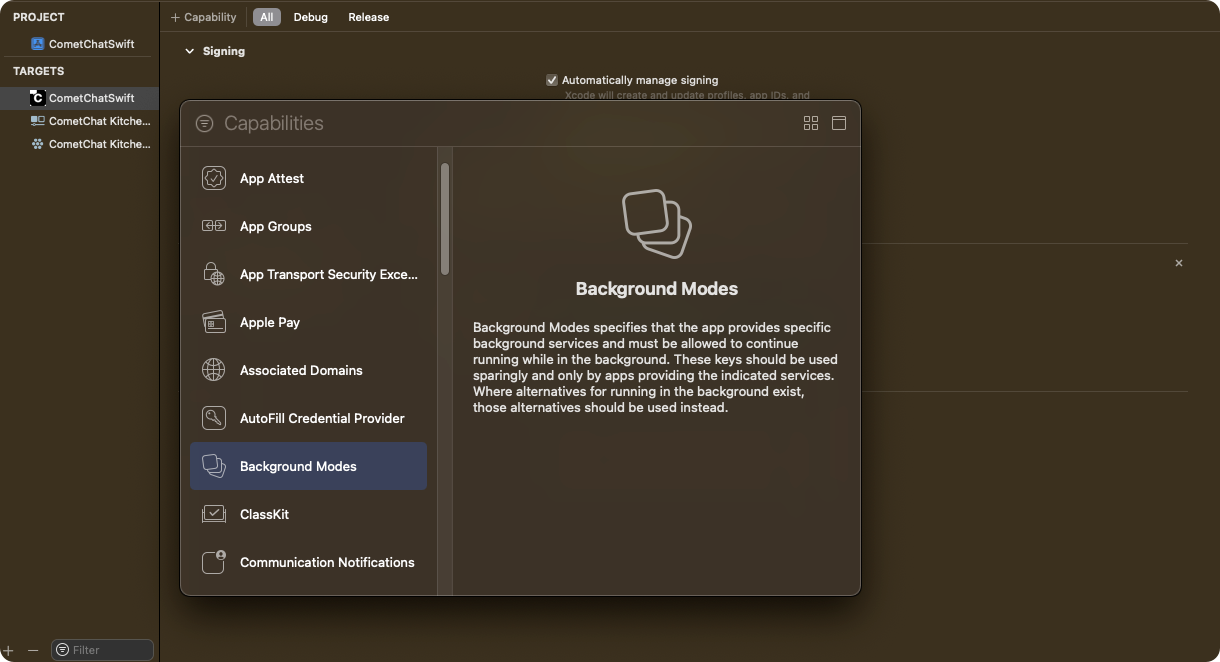
## Step 1. Add Background Modes in Capabilities
Click on Targets -> Project -> \[+ Capability] -> Add 'Background Modes' section.
In iOS, when the user enters in the background state, real time connection breaks with the server. So, if the user comes inside the chat window or in the conversation list then it won't update the new messages received from the real time server until it's being fetched from the API.
To keep user interaction alive with the application you can add our service which keeps real time connection alive in a background state for a few seconds. If the user is constantly switching between multiple applications at the same time, this service will help to update real time updates on the UI.
## Background updates behaviour
This below table is applicable only when [these steps are followed](/sdk/ios/prepare-your-app-for-background-updates#step-1-add-background-modes-in-capabilities).
autoEstablishSocketConnection usage can be found in [Managing Web-Socket connections manually](/sdk/ios/managing-web-socket-connections-manually).
| | Value | Behaviour |
| ----------------------------- | ----- | -------------------------------------------------------------------------------------------------------------------------------------------------------------------------------------------------------------------------------------------------------- |
| autoEstablishSocketConnection | true | Connection is maintained in background for 30 seconds and after that it is killed. |
| autoEstablishSocketConnection | false | 1. If `CometChat.connect()` is called and app goes to background the connection is maintained for 30 seconds and after that connection is terminated. 2. If `CometChat.disconnect()` is called and app goes to background the connection not maintained. |
Please follow the steps to prepare your app for background states.
***
## Step 1. Add Background Modes in Capabilities
Click on Targets -> Project -> \[+ Capability] -> Add 'Background Modes' section.
 ***
## Step 2. Select Background modes for processing
Select 'Background Fetch' and 'Background Processing' options by ticking them.
***
## Step 2. Select Background modes for processing
Select 'Background Fetch' and 'Background Processing' options by ticking them.
 ***
## Step 3. Add Code in Application class to configure background services for different states.
Add `CometChat.configureServices`method in application class or scene delegate class as shown below.
```swift theme={null}
func applicationWillResignActive(_ application: UIApplication) {
CometChat.configureServices(.willResignActive)
}
func applicationDidEnterBackground(_ application: UIApplication) {
CometChat.configureServices(.didBackground)
}
```
**Method Signature:**
| Parameter | Type | Description |
| --------- | ---------------- | ------------------------------ |
| Input | ApplicationState | App lifecycle state enum value |
| Returns | Void | No return value |
**ApplicationState Enum:**
| Value | Description |
| ----------------- | ----------------------------------------------------------------------------------------------------------------- |
| .willResignActive | App is about to move from active to inactive state. Called when user presses home button or receives interruption |
| .didBackground | App has fully entered the background state. Called after transition is complete |
**Application Lifecycle Events:**
| Event | UIApplication Method | CometChat Configuration |
| ---------------------- | ----------------------------------- | ------------------------------------------------ |
| App becoming inactive | `applicationWillResignActive(_:)` | `CometChat.configureServices(.willResignActive)` |
| App entered background | `applicationDidEnterBackground(_:)` | `CometChat.configureServices(.didBackground)` |
**Background Task Lifecycle Flow:**
| Step | Event | Action | Description |
| ---- | ------------------------ | -------------------------------------- | -------------------------------------- |
| 1 | User presses home button | `applicationWillResignActive` called | App begins transition to background |
| 2 | Transition completes | `applicationDidEnterBackground` called | Background task starts |
| 3 | Background task runs | WebSocket connection maintained | Connection kept alive for \~30 seconds |
| 4 | Timeout reached (\~30s) | System terminates task | Connection terminated by iOS |
**Connection Behavior Based on autoEstablishSocketConnection:**
| autoEstablishSocketConnection | Background Behavior |
| ----------------------------------------- | --------------------------------------------------------------- |
| `true` | Connection maintained for 30 seconds, then killed automatically |
| `false` + `CometChat.connect()` called | Connection maintained for 30 seconds, then terminated |
| `false` + `CometChat.disconnect()` called | Connection not maintained in background |
**Related Configuration:**
| Setting | Location | Description |
| ----------------------------- | --------------------------------------------------------------------------------------------- | ---------------------------------------------------------- |
| autoEstablishSocketConnection | [Managing Web-Socket connections manually](/sdk/ios/managing-web-socket-connections-manually) | Controls automatic socket connection behavior |
| Background Modes | Xcode Capabilities | Must enable "Background fetch" and "Background Processing" |
1. As per the iOS standard guidelines, this service will keep alive for few seconds in background services in the system. After few seconds it will get terminated automatically by the system.
2. This service is only available after SDK **v4.x.x** & **UI Kit v4.x.x**
***
## Step 4. Check background service is running
You can check the background service is running or not using `CometChat.BackgroundTaskEnabled()` method. It will return **`true`** if service is running else it will return `false`.
```swift theme={null}
if CometChat.backgroundTaskEnabled() {
print("Background service is running, it will automatically update UI.")
}else{
print("Background service is stopped, Please refresh messages or conversations here to update.")
}
```
**Method Signature:**
| Parameter | Type | Description |
| --------- | ---- | ------------------------------ |
| Input | None | No input parameters |
| Returns | Bool | Background task running status |
**Return Values:**
| Return Value | Type | Description |
| ------------ | ---- | ----------------------------------------------------------- |
| `true` | Bool | Background service is running, real-time updates are active |
| `false` | Bool | Background service is stopped, manual refresh required |
**Usage Scenarios:**
| Scenario | backgroundTaskEnabled() | Recommended Action |
| ---------------------------------- | ----------------------- | --------------------------------------------------------------------- |
| App just entered background | `true` | No action needed, UI updates automatically |
| Background timeout reached (\~30s) | `false` | Refresh messages/conversations when app returns to foreground |
| User switches apps quickly | `true` | Real-time updates continue seamlessly |
| App in background > 30 seconds | `false` | Call refresh APIs on `viewWillAppear` or `applicationDidBecomeActive` |
**Integration with UI Components:**
| State | UI Behavior | Recommended Implementation |
| ------- | ---------------------------------------------- | -------------------------------------------------------- |
| `true` | Messages and conversations update in real-time | No additional action required |
| `false` | UI may be stale | Show refresh indicator or auto-fetch on `viewWillAppear` |
**Conditional Refresh Pattern:**
| Step | Check | Action |
| ---- | ----------------------- | ---------------------------------------------------------------------------- |
| 1 | `viewWillAppear` called | Check `CometChat.backgroundTaskEnabled()` |
| 2 | Returns `false` | Call `MessagesRequest.fetchPrevious()` or `ConversationsRequest.fetchNext()` |
| 3 | Returns `true` | Skip refresh, real-time updates are active |
**Related Methods:**
| Method | Description | Link |
| --------------------------------- | --------------------------------------- | --------------------------------------------------------------------------------------------------------------- |
| `CometChat.configureServices(_:)` | Configure background services | See [Step 3](#step-3-add-code-in-application-class-to-configure-background-services-for-different-states) above |
| `CometChat.connect()` | Manually establish WebSocket connection | [Managing Web-Socket connections manually](/sdk/ios/managing-web-socket-connections-manually) |
| `CometChat.disconnect()` | Manually close WebSocket connection | [Managing Web-Socket connections manually](/sdk/ios/managing-web-socket-connections-manually) |
| `CometChat.getConnectionStatus()` | Get current connection status | [Connection Status](/sdk/ios/connection-status) |
***
***
## Step 3. Add Code in Application class to configure background services for different states.
Add `CometChat.configureServices`method in application class or scene delegate class as shown below.
```swift theme={null}
func applicationWillResignActive(_ application: UIApplication) {
CometChat.configureServices(.willResignActive)
}
func applicationDidEnterBackground(_ application: UIApplication) {
CometChat.configureServices(.didBackground)
}
```
**Method Signature:**
| Parameter | Type | Description |
| --------- | ---------------- | ------------------------------ |
| Input | ApplicationState | App lifecycle state enum value |
| Returns | Void | No return value |
**ApplicationState Enum:**
| Value | Description |
| ----------------- | ----------------------------------------------------------------------------------------------------------------- |
| .willResignActive | App is about to move from active to inactive state. Called when user presses home button or receives interruption |
| .didBackground | App has fully entered the background state. Called after transition is complete |
**Application Lifecycle Events:**
| Event | UIApplication Method | CometChat Configuration |
| ---------------------- | ----------------------------------- | ------------------------------------------------ |
| App becoming inactive | `applicationWillResignActive(_:)` | `CometChat.configureServices(.willResignActive)` |
| App entered background | `applicationDidEnterBackground(_:)` | `CometChat.configureServices(.didBackground)` |
**Background Task Lifecycle Flow:**
| Step | Event | Action | Description |
| ---- | ------------------------ | -------------------------------------- | -------------------------------------- |
| 1 | User presses home button | `applicationWillResignActive` called | App begins transition to background |
| 2 | Transition completes | `applicationDidEnterBackground` called | Background task starts |
| 3 | Background task runs | WebSocket connection maintained | Connection kept alive for \~30 seconds |
| 4 | Timeout reached (\~30s) | System terminates task | Connection terminated by iOS |
**Connection Behavior Based on autoEstablishSocketConnection:**
| autoEstablishSocketConnection | Background Behavior |
| ----------------------------------------- | --------------------------------------------------------------- |
| `true` | Connection maintained for 30 seconds, then killed automatically |
| `false` + `CometChat.connect()` called | Connection maintained for 30 seconds, then terminated |
| `false` + `CometChat.disconnect()` called | Connection not maintained in background |
**Related Configuration:**
| Setting | Location | Description |
| ----------------------------- | --------------------------------------------------------------------------------------------- | ---------------------------------------------------------- |
| autoEstablishSocketConnection | [Managing Web-Socket connections manually](/sdk/ios/managing-web-socket-connections-manually) | Controls automatic socket connection behavior |
| Background Modes | Xcode Capabilities | Must enable "Background fetch" and "Background Processing" |
1. As per the iOS standard guidelines, this service will keep alive for few seconds in background services in the system. After few seconds it will get terminated automatically by the system.
2. This service is only available after SDK **v4.x.x** & **UI Kit v4.x.x**
***
## Step 4. Check background service is running
You can check the background service is running or not using `CometChat.BackgroundTaskEnabled()` method. It will return **`true`** if service is running else it will return `false`.
```swift theme={null}
if CometChat.backgroundTaskEnabled() {
print("Background service is running, it will automatically update UI.")
}else{
print("Background service is stopped, Please refresh messages or conversations here to update.")
}
```
**Method Signature:**
| Parameter | Type | Description |
| --------- | ---- | ------------------------------ |
| Input | None | No input parameters |
| Returns | Bool | Background task running status |
**Return Values:**
| Return Value | Type | Description |
| ------------ | ---- | ----------------------------------------------------------- |
| `true` | Bool | Background service is running, real-time updates are active |
| `false` | Bool | Background service is stopped, manual refresh required |
**Usage Scenarios:**
| Scenario | backgroundTaskEnabled() | Recommended Action |
| ---------------------------------- | ----------------------- | --------------------------------------------------------------------- |
| App just entered background | `true` | No action needed, UI updates automatically |
| Background timeout reached (\~30s) | `false` | Refresh messages/conversations when app returns to foreground |
| User switches apps quickly | `true` | Real-time updates continue seamlessly |
| App in background > 30 seconds | `false` | Call refresh APIs on `viewWillAppear` or `applicationDidBecomeActive` |
**Integration with UI Components:**
| State | UI Behavior | Recommended Implementation |
| ------- | ---------------------------------------------- | -------------------------------------------------------- |
| `true` | Messages and conversations update in real-time | No additional action required |
| `false` | UI may be stale | Show refresh indicator or auto-fetch on `viewWillAppear` |
**Conditional Refresh Pattern:**
| Step | Check | Action |
| ---- | ----------------------- | ---------------------------------------------------------------------------- |
| 1 | `viewWillAppear` called | Check `CometChat.backgroundTaskEnabled()` |
| 2 | Returns `false` | Call `MessagesRequest.fetchPrevious()` or `ConversationsRequest.fetchNext()` |
| 3 | Returns `true` | Skip refresh, real-time updates are active |
**Related Methods:**
| Method | Description | Link |
| --------------------------------- | --------------------------------------- | --------------------------------------------------------------------------------------------------------------- |
| `CometChat.configureServices(_:)` | Configure background services | See [Step 3](#step-3-add-code-in-application-class-to-configure-background-services-for-different-states) above |
| `CometChat.connect()` | Manually establish WebSocket connection | [Managing Web-Socket connections manually](/sdk/ios/managing-web-socket-connections-manually) |
| `CometChat.disconnect()` | Manually close WebSocket connection | [Managing Web-Socket connections manually](/sdk/ios/managing-web-socket-connections-manually) |
| `CometChat.getConnectionStatus()` | Get current connection status | [Connection Status](/sdk/ios/connection-status) |
***