> ## Documentation Index
> Fetch the complete documentation index at: https://cometchat-22654f5b-docs-ios-ui-kit-sdk-fixes.mintlify.site/llms.txt
> Use this file to discover all available pages before exploring further.
# Remove Delivered Notifications
> Guide to removing delivered push notifications programmatically using Notification Service Extension.
**Quick Reference for AI Agents & Developers**
* **Requires:** UNNotificationServiceExtension target in your app
* **Remove specific:** `UNUserNotificationCenter.current().removeDeliveredNotifications(withIdentifiers:)`
* **Remove all:** `UNUserNotificationCenter.current().removeAllDeliveredNotifications()`
* **Use case:** Clear notifications when user reads message in-app
* **Related:** [Push Notifications](/sdk/ios/push-notification-overview) · [Increment Badge Count](/sdk/ios/increment-app-icon-badge-count)
This guide helps you to set up with which you can remove certainly delivered notifications using **Notification Service Extension**.
For removing notifications you will need to add Notification Service in your project. Please follow the below step to add Notification Service Extension in your app.
***
## UNNotificationServiceExtension
This service grabs the data from the push notification payload, the user can modify its content and display the customized data on to the push notification.
In our case, we are modifying the data of the push notification and incrementing the badge count when a new push notification is received.
If you already have Notification Service Extension then you can skip Step1.
Let's begin to implement an incremented badge count for your app.
***
### **Step 1: Add UNNotificationServiceExtension inside the app.**
1. Click on `File` --> `New` --> `Targets` --> `Application Extension` --> `Notification Service Extension`.
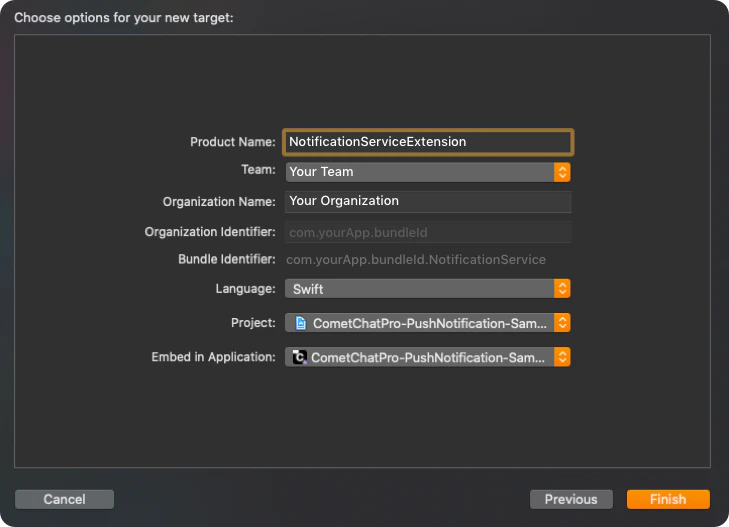
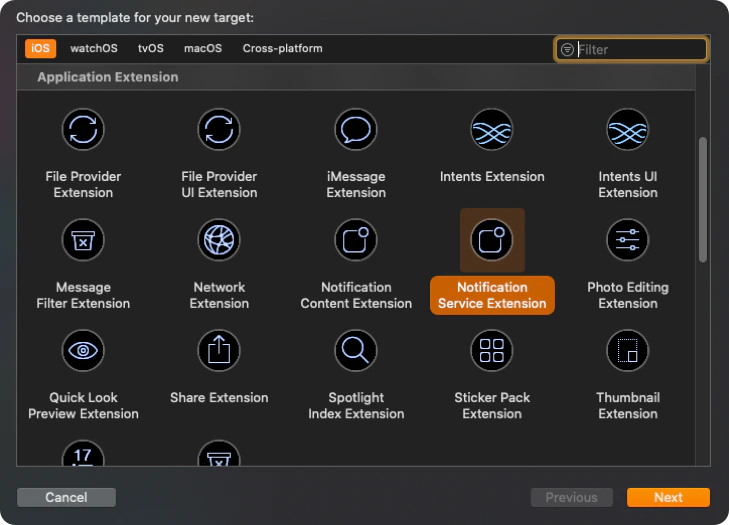 2. Add `Product Name` and click on `Finish`.
 ### **Step 2: Add CometChat SDK in your Notification Extension.**
Make sure you are adding the CometChat SDK in your Notification Extension. So in case if you are using pods then your pod file should contain the following:
```ruby theme={null}
platform :ios, '11.0'
use_frameworks!
target 'MyApp' do
pod 'CometChatSDK', '4.0.67'
end
target 'NotificationExtension' do
pod 'CometChatSDK', '4.0.67'
end
```
### **Step 3: Add Code for removing Notifications.**
Once you have successfully configured the Notification Service then add the below code in `didReceive(_ request: UNNotificationRequest, withContentHandler contentHandler: @escaping (UNNotificationContent)` method under `bestAttemptContent` condition. The below code shows how you can remove the notifications for `call` type messages since we need to show the latest call notification.
```swift theme={null}
import CometChatSDK
override func didReceive(_ request: UNNotificationRequest, withContentHandler contentHandler: @escaping (UNNotificationContent) -> Void) {
self.contentHandler = contentHandler
bestAttemptContent = (request.content.mutableCopy() as? UNMutableNotificationContent)
if let bestAttemptContent = bestAttemptContent {
__ Modify the notification content here...
var customID : String = ""
if let userInfo = request.content.userInfo as? [String : Any], let messageObject = userInfo["message"], let str = messageObject as? String, let dict = str.stringTodictionary() {
if let baseMessage = CometChat.processMessage(dict).0 {
switch baseMessage.messageCategory {
case .message: break
case .action: break
case .call:
if let call = baseMessage as? Call {
customID = call.sessionID!
}
case .custom: break
@unknown default: break
}
}
}
UNUserNotificationCenter.current().getDeliveredNotifications { notifications in
var id : String = ""
let matching = notifications.first(where: { notify in
if let existingUserInfo = request.content.userInfo as? [String : Any], let messageObject = existingUserInfo["message"], let str = messageObject as? String, let dict = str.stringTodictionary() {
if let baseMessage = CometChat.processMessage(dict).0 {
switch baseMessage.messageCategory {
case .message: break
case .action: break
case .call:
if let call = baseMessage as? Call {
id = call.sessionID!
}
case .custom: break
@unknown default: break
}
}
}
return id == customID
})
if let matchExists = matching {
UNUserNotificationCenter.current().removeDeliveredNotifications(
withIdentifiers: [matchExists.request.identifier])
}
}
}
}
```
In the above code, we are trying to remove the previous notification of the call message when the end call or unanswered call notification appears. Since we always have to show the latest notification for calls. We are removing the previous call notifications based on the call `sessionID`.
You can change the implementation as per your service. Once you added the code the above code add the completion handler in the main thread like shown below:
```swift theme={null}
DispatchQueue.main.asyncAfter(deadline: .now() + 0.2) {
contentHandler(bestAttemptContent)
}
```
**Push Notification userInfo\["message"] Dictionary:**
| Parameter | Type | Description |
| ------------ | ------ | -------------------------------------------------------- |
| id | Int | Unique message identifier. Example: `12345` |
| category | String | Message category. Example: `"call"` |
| type | String | Call type. Example: `"audio"` |
| sessionId | String | Unique call session ID. Example: `"call_session_abc123"` |
| sender | String | Sender UID. Example: `"john_doe"` |
| receiver | String | Receiver UID. Example: `"jane_smith"` |
| receiverType | String | Receiver type. Example: `"user"` |
| status | String | Call status. Example: `"initiated"` |
| sentAt | Int | Unix timestamp. Example: `1699800000` |
**Returns:** `(BaseMessage?, CometChatException?)`
**Call Object (when category is "call"):**
| Parameter | Type | Description |
| --------------- | --------------- | --------------------------------------------------- |
| id | Int | Message ID. Example: `12345` |
| messageCategory | MessageCategory | Category. Example: `.call` |
| sessionID | String? | Call session ID. Example: `"call_session_abc123"` |
| callStatus | CallStatus | Status. Example: `.initiated` |
| callType | CallType | Type. Example: `.audio` |
| sender | User | Sender details. Example: `User { uid: "john_doe" }` |
**UNNotification Object:**
| Parameter | Type | Description |
| ------------------------ | ------------------- | ---------------------------------------------------------- |
| request.identifier | String | Unique notification ID. Example: `"notification_uuid_123"` |
| request.content.title | String | Notification title. Example: `"Incoming Call"` |
| request.content.body | String | Notification body. Example: `"John Doe is calling..."` |
| request.content.userInfo | \[AnyHashable: Any] | Push payload data |
**removeDeliveredNotifications Input:**
| Parameter | Type | Description |
| ----------- | --------- | ------------------------------------------------------------------------- |
| identifiers | \[String] | Array of notification IDs to remove. Example: `["notification_uuid_123"]` |
**Call Notification Flow:**
| Step | Action | Description |
| ---- | -------------------------- | ----------------------------------------------- |
| 1 | Incoming call arrives | `{ sessionId: "abc123", status: "initiated" }` |
| 2 | Call ends/unanswered | `{ sessionId: "abc123", status: "unanswered" }` |
| 3 | Find matching notification | Match by sessionId |
| 4 | Remove old notification | Show only "Missed Call" |
### **Step 2: Add CometChat SDK in your Notification Extension.**
Make sure you are adding the CometChat SDK in your Notification Extension. So in case if you are using pods then your pod file should contain the following:
```ruby theme={null}
platform :ios, '11.0'
use_frameworks!
target 'MyApp' do
pod 'CometChatSDK', '4.0.67'
end
target 'NotificationExtension' do
pod 'CometChatSDK', '4.0.67'
end
```
### **Step 3: Add Code for removing Notifications.**
Once you have successfully configured the Notification Service then add the below code in `didReceive(_ request: UNNotificationRequest, withContentHandler contentHandler: @escaping (UNNotificationContent)` method under `bestAttemptContent` condition. The below code shows how you can remove the notifications for `call` type messages since we need to show the latest call notification.
```swift theme={null}
import CometChatSDK
override func didReceive(_ request: UNNotificationRequest, withContentHandler contentHandler: @escaping (UNNotificationContent) -> Void) {
self.contentHandler = contentHandler
bestAttemptContent = (request.content.mutableCopy() as? UNMutableNotificationContent)
if let bestAttemptContent = bestAttemptContent {
__ Modify the notification content here...
var customID : String = ""
if let userInfo = request.content.userInfo as? [String : Any], let messageObject = userInfo["message"], let str = messageObject as? String, let dict = str.stringTodictionary() {
if let baseMessage = CometChat.processMessage(dict).0 {
switch baseMessage.messageCategory {
case .message: break
case .action: break
case .call:
if let call = baseMessage as? Call {
customID = call.sessionID!
}
case .custom: break
@unknown default: break
}
}
}
UNUserNotificationCenter.current().getDeliveredNotifications { notifications in
var id : String = ""
let matching = notifications.first(where: { notify in
if let existingUserInfo = request.content.userInfo as? [String : Any], let messageObject = existingUserInfo["message"], let str = messageObject as? String, let dict = str.stringTodictionary() {
if let baseMessage = CometChat.processMessage(dict).0 {
switch baseMessage.messageCategory {
case .message: break
case .action: break
case .call:
if let call = baseMessage as? Call {
id = call.sessionID!
}
case .custom: break
@unknown default: break
}
}
}
return id == customID
})
if let matchExists = matching {
UNUserNotificationCenter.current().removeDeliveredNotifications(
withIdentifiers: [matchExists.request.identifier])
}
}
}
}
```
In the above code, we are trying to remove the previous notification of the call message when the end call or unanswered call notification appears. Since we always have to show the latest notification for calls. We are removing the previous call notifications based on the call `sessionID`.
You can change the implementation as per your service. Once you added the code the above code add the completion handler in the main thread like shown below:
```swift theme={null}
DispatchQueue.main.asyncAfter(deadline: .now() + 0.2) {
contentHandler(bestAttemptContent)
}
```
**Push Notification userInfo\["message"] Dictionary:**
| Parameter | Type | Description |
| ------------ | ------ | -------------------------------------------------------- |
| id | Int | Unique message identifier. Example: `12345` |
| category | String | Message category. Example: `"call"` |
| type | String | Call type. Example: `"audio"` |
| sessionId | String | Unique call session ID. Example: `"call_session_abc123"` |
| sender | String | Sender UID. Example: `"john_doe"` |
| receiver | String | Receiver UID. Example: `"jane_smith"` |
| receiverType | String | Receiver type. Example: `"user"` |
| status | String | Call status. Example: `"initiated"` |
| sentAt | Int | Unix timestamp. Example: `1699800000` |
**Returns:** `(BaseMessage?, CometChatException?)`
**Call Object (when category is "call"):**
| Parameter | Type | Description |
| --------------- | --------------- | --------------------------------------------------- |
| id | Int | Message ID. Example: `12345` |
| messageCategory | MessageCategory | Category. Example: `.call` |
| sessionID | String? | Call session ID. Example: `"call_session_abc123"` |
| callStatus | CallStatus | Status. Example: `.initiated` |
| callType | CallType | Type. Example: `.audio` |
| sender | User | Sender details. Example: `User { uid: "john_doe" }` |
**UNNotification Object:**
| Parameter | Type | Description |
| ------------------------ | ------------------- | ---------------------------------------------------------- |
| request.identifier | String | Unique notification ID. Example: `"notification_uuid_123"` |
| request.content.title | String | Notification title. Example: `"Incoming Call"` |
| request.content.body | String | Notification body. Example: `"John Doe is calling..."` |
| request.content.userInfo | \[AnyHashable: Any] | Push payload data |
**removeDeliveredNotifications Input:**
| Parameter | Type | Description |
| ----------- | --------- | ------------------------------------------------------------------------- |
| identifiers | \[String] | Array of notification IDs to remove. Example: `["notification_uuid_123"]` |
**Call Notification Flow:**
| Step | Action | Description |
| ---- | -------------------------- | ----------------------------------------------- |
| 1 | Incoming call arrives | `{ sessionId: "abc123", status: "initiated" }` |
| 2 | Call ends/unanswered | `{ sessionId: "abc123", status: "unanswered" }` |
| 3 | Find matching notification | Match by sessionId |
| 4 | Remove old notification | Show only "Missed Call" |