

Quick Reference for AI Agents & Developers
- Components used: CometChatConversations, CometChatUsers, CometChatGroups, CometChatCallLogs
User Interface Preview
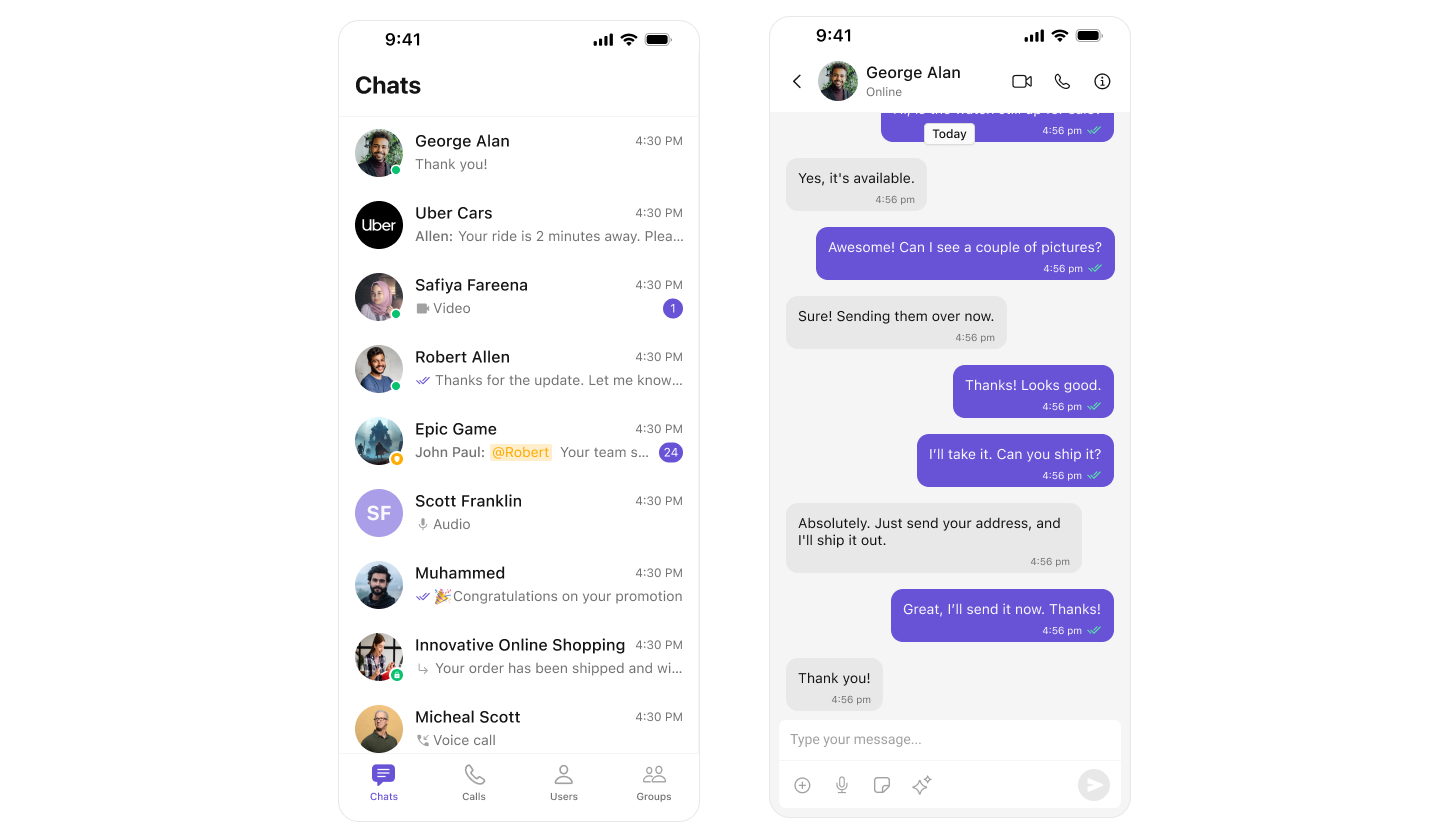
- Conversations – Lists all recent chats.
- Calls – Displays call logs.
- Users – Lists available users.
- Groups – Lists available groups.
Step-by-Step Guide
Step 1: Initialize UIKit in SceneDelegate.swift
Ensure UIKit is initialized and the user is logged in before presenting the tabbed view. See the Integration Guide for full init and login setup.
SceneDelegate.swift
Step 2: Setup Tab Bar
Create a method to display the tab layout using CometChatConversations, CometChatCallLogs, CometChatUsers, and CometChatGroups.SceneDelegate.swift
Step 3: Create MessagesVC.swift
This view controller handles chat between users or within groups. It composes three core UI Kit components: CometChatMessageHeader, CometChatMessageList, and CometChatMessageComposer.
MessagesVC.swift
Next Steps
Conversation List + Messages
Two-panel layout with conversation list and message view
One-to-One Chat
Launch directly into a specific user or group chat
Theme Introduction
Customize colors, fonts, and styles to match your brand
Components Overview
Explore all available UI components